Running scripts
Running a script executes its SQL against a live database. For a single component you use the Run actions on the component grid; for a coordinated release you run the whole deployment.
Running is not gated by an environment flag; the script executes against whichever connection is active. The database name in the status bar is the ground truth. Glance at it before you click Run.
The two run actions
Both are on the row's right-click Run submenu, and on the toolbar.
| Action | Behaviour |
|---|---|
| Run with Current Connection (Ctrl+E) | Runs against whatever connection is active in the status bar. |
| Run with Connection… | Prompts for a connection from your saved list, runs there. The workspace's active connection does not change. |
The Run Script dialog
Both actions open the Run Script dialog. It has:
- A Mode dropdown with two values:
- COMMIT. Changes are permanently applied to the database.
- ROLLBACK. The script runs inside a transaction that is rolled back at the end. Useful for testing without persisting anything.
- Run and Cancel buttons.
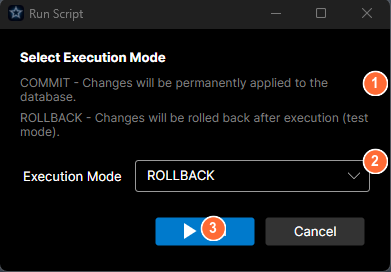
- Mode explanation: describes what COMMIT and ROLLBACK do.
- Execution Mode dropdown: pick COMMIT (permanent) or ROLLBACK (test run).
- Run and Cancel buttons.
Pick the mode, click Run. The resulting log opens in a new tab.
What happens next
When the script completes, the log tab shows:
- Each statement and its outcome.
- Row counts, messages, errors (with line numbers).
- The final commit or rollback.
If the script errors, DataStar rolls back automatically; you don't get the choice at the end.
Running an external script file
To run a standalone script that isn't a component or a deployment - a one-off fix, a hand-written migration, a vendor-supplied script, or an exported reversal - use Deployment → Run External Script…. DataStar:
- Prompts you to pick a
.sqlfile or a.zippackage (the package format produced by the Oracle exports - see Reversal output format). - Opens the database connection dialog with the same COMMIT / ROLLBACK mode picker. Choose the connection to run against and the mode. The mode defaults to ROLLBACK so you can trial the script without persisting anything.
- Runs it and streams the output to a new log tab, exactly like the component run above.
A .sql file runs as a single unit. A .zip package is unpacked and its scripts run in order, one at a time (via the package's manifest.mf), the same way a deployment runs - so each statement is split correctly for the target database.
Because you pick the connection in the dialog, this neither uses nor changes the workspace's active connection - so the status-bar caveat above doesn't apply; the connection you select in the dialog is what runs. No reversal script is captured for an external run; if you need a rollback artefact, run it as a deployment with reversal instead.
Running a whole deployment instead
Single-component run is for development and checks. For a release, build a deployment basket and run the whole thing: ordered, logged, and recorded in deployment history.