Deploy only your rows (changesets)
Some tables are shared. Several people work in the same development database, in the same table, on different tickets, at the same time. Extract that table and you get everyone's work in flight, not yours, and deploying it carries their unfinished rows with it.
A changeset records only the rows your work item changed, each as a before and an after, and deploys only those. Everyone else's rows are left exactly as the target holds them. (This is a data changeset, a file in your workspace; it has nothing to do with a TFVC changeset, which is a check-in.)
Every row in a changeset is checked against the target database before anything is written. A row the target still holds at the changeset's before is written; a row already at the after is skipped; a row at neither stops the whole deployment, which applies nothing. See When the before does not match the target.
Turn it on
Two attributes on the data template:
<DataComponent Category="reference-data" Name="country"
               OutputFormat="json" DeployMode="changeset" Version="2">
  <Table Id="1" Name="COUNTRY">
    <Column Name="COUNTRY_CODE" PrimaryKey="true"/>
  </Table>
</DataComponent>
A template qualifies when:
- it sets
DeployMode="changeset"; - it sets
OutputFormat="json": a changeset is a data document; - on SQL Server it is
Version2, which is the default; a template that setsVersion="1"is refused, because a version 1 script deletes inside the MERGE and so has no list of keys for a changeset to delete (Oracle has no such split); - every table has a key that identifies a row in any environment: an alternative key, or a primary key that the target does not generate. A generated key is identified through the joined parent's alternative keys or the column's lookup criteria instead; a table with neither is reported when you pull (
Rows of table 'X' cannot be identified: ...); - no
JoinTableusesBruteForce, which resolves against the parent's staged rows, and a changeset stages only its own.
DataStar checks the template wherever a changeset is created, added to a deployment or applied, and names the reason when it does not qualify: must set OutputFormat="json": a changeset is a data document, must set Version="2" for SQL Server, and so on.
How it fits together
Three things, and it is worth being clear which is which:
| What it is | |
|---|---|
| The workspace file (the component's document) | components/<category>/<name>.json: the rows as your branch has them. The base plus your work item's rows. |
| The changeset | changesets/<work item>/<category>/<name>.json: the rows your work item changed, each with its before and after. |
| The base | What the changeset is measured from: what the workspace file started from, normally main's rows as your branch left them. |
The base is not stored. It is worked out whenever it is needed by taking the workspace file and undoing the changeset: each changed row goes back to its before, each inserted row goes, each deleted row comes back. That is why the workspace file and the changeset are kept in step, and why DataStar will not let you commit one that disagrees with the other: the changeset is a difference, not a thing in its own right, and half of it is worse than neither.
The changesets folder sits beside the component folder, never inside a category, so component listing and extraction never see a changeset. Its name is the workspace's Changeset Location (workspace settings); the folder under it is the work item's key, made safe for a file name.
The work item is the basket's task when one is set, otherwise the task assigned to the branch. Without either, a pull stops with Pulling changes into a changeset needs a work item: set the basket's task, or assign a task to the branch.
The Changesets chip
A category tab whose template deploys changesets has a Changesets chip at the right of its toolbar, in the same teal as the grid's CS badge. It shows the work item and, in a count pill, how many of the tab's components have a changeset for it; there is no pill while none do. With no work item, it shows an orange dot and No work item. The chip is not shown on the basket tab or on a category whose template does not deploy changesets. It is brought up to date after a refresh (so a template edit shows), a branch switch, a change of work item and each pull.
Hovering over it gives a one-line summary, for example This category deploys changesets. DAT-21 has a changeset for 1 component here. Clicking it opens a flyout headed This category deploys changesets:
Its components are not pulled into the branch whole. Pull My Changes compares a source with a base and you tick the rows that are yours; only those reach the branch.
A deployment applies the work item's changeset, the rows it adds, changes and removes. Without one, the whole document goes in, after asking.
Below that is the work item's status:
| When | The flyout says |
|---|---|
| There is no work item (shown in orange) | There is no work item, so there is nowhere to keep a changeset. Set the current task in the status bar before pulling changes. See Active task. |
| The work item has no changeset on this tab | DAT-21 has no changesets in this category yet. |
| It has one or more | DAT-21 has a changeset for 1 component here, marked CS in the grid. or DAT-21 has changesets for 3 components here, marked CS in the grid. |
The flyout's Pull My Changes... button runs Pull My Changes on the selected components and closes the flyout. It is disabled while there is no work item, and until you select components whose template deploys changesets (the flyout then says Select the components to pull in the grid first.). The other changeset actions are on the right-click menu.
The everyday workflow
Two people share the DEV database. You are on DAT-21, adding a country (XK) and moving GB to a new region. A colleague on DAT-22 is renaming FR in the same table.
-
Start the work item.
DAT-21is the active task, so DataStar has a branch for it and knows which work item your changesets belong to. -
Change DEV through the application, as you would anyway.
-
Pull My Changes... on
reference-data / country(right-click the component). Leave step 1 at The current workspace file and step 2 at The current connection (DEV), then Continue.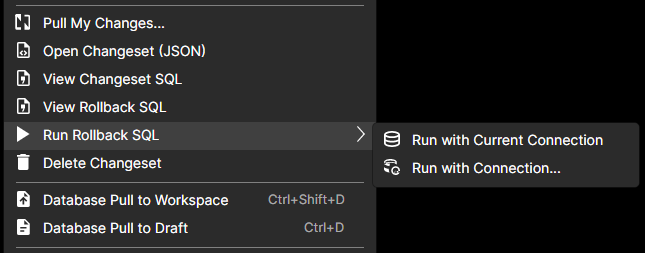
-
Tick your rows. The picker lists three differences:
XK(insert),GB(update) andFR(update). TickXKandGB. LeaveFR: it is your colleague's. Apply Ticked Rows. -
Pull Complete says
Changeset updated,2 rows added by this pull, with the changeset's counts:1 inserted,1 updated,0 deleted. The component grid shows aCSbadge on the component; its tooltip readsChangeset for DAT-21: +1 ~1 -0 row(s). -
Commit both files: the workspace file, which now holds main's rows plus your two (
FRis untouched in it), and the changeset. -
Add it to the deployment. In the Deployment view, Add Components..., choose
DataChangesetsas the add method and enterDAT-21. The item ischangesets/DAT-21/reference-data/country.json, withCSin the Kind column. -
Deploy to UAT. The script checks each row against UAT, finds
XKabsent andGBat its before, and writes both.FRis not in the changeset, so UAT'sFRis left as it is. -
Deploy it again, by mistake or on purpose: both rows are already at their after, the script reports
Changeset Changes Already Applied : 2, and nothing changes. -
Promote to production with the same changeset. Its befores are main's rows, which are the same in every environment, so what applied in UAT applies in production.
-
Your colleague deploys
DAT-22before or after you. It touches onlyFR, so the two never conflict.
The rest of this page takes each step in turn.
Pull My Changes
Pull My Changes... is on the component's context menu for any component whose template deploys changesets, and in the Changesets chip's flyout. Select several components to pull them in one go; the choices below apply to all of them.
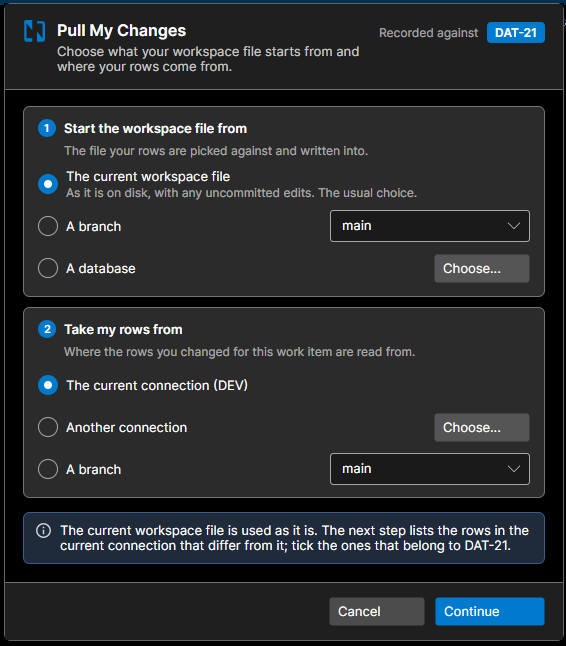
The dialog asks two questions. The work item the changeset is recorded against is shown at the top right (Recorded against DAT-21).
Step 1: Start the workspace file from
The file your rows are picked against and written into.
| Choice | What it means |
|---|---|
| The current workspace file | As it is on disk, with any uncommitted edits. The usual choice. When the work item already has a changeset for the component, the rows you tick are added to it. |
| A branch | The component's document as committed on the branch you pick, main for example. |
| A database | Another database, chosen with Choose..., for example production. Use it to capture a change somebody made straight into an environment. |
Choosing a branch or a database is not a comparison setting: it resets the workspace file. The dialog says so as you choose: Your workspace file is reset to branch 'main' as it is now, and the rows you tick in the next step are added to it. Everything else in the file is replaced, including DAT-21's changes, and DAT-21's changeset is reset.
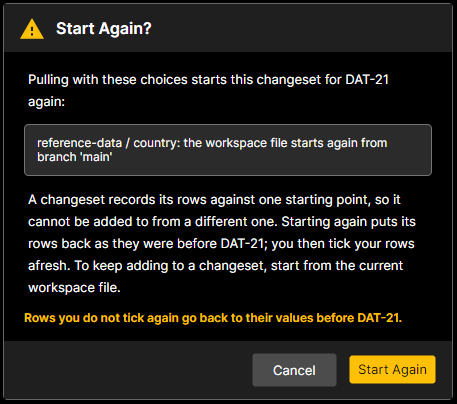
When the work item already has a changeset for the component, Continue asks first:
Start Again? Pulling with these choices starts this changeset for DAT-21 again:
- reference-data / country: the workspace file starts again from branch 'main'
A changeset records its rows against one starting point, so it cannot be added to from a different one. Starting again puts its rows back as they were before DAT-21; you then tick your rows afresh. To keep adding to a changeset, start from the current workspace file.
Rows you do not tick again go back to their values before DAT-21.
Start Again opens the picker over the new base. Nothing is ticked in that picker: it is a fresh pull, so tick your rows again. The changeset is not undone yet. It is undone, exactly as Delete Changeset would undo it, only when you Apply Ticked Rows, in the same step as your new rows are written. Cancel in the picker, a tick that is refused, or a pull that finds nothing new leaves the changeset and the workspace file as they were. Cancel on the question leaves everything as it was too.
Step 2: Take my rows from
Where the rows you changed for this work item are read from.
| Choice | What it means |
|---|---|
| The current connection (DEV) | The database the workspace is connected to now. Disabled when nothing is connected. |
| Another connection | A saved connection, chosen with Choose..., for example the environment the change was made in. |
| A branch | The component's document as committed on another branch. |
The dialog remembers where each changeset last took its rows from and preselects it, saying so: Where your rows came from in the last pull of this changeset, on 12 Sep 2026, is selected. A remembered connection is opened only when you Continue. The starting point is never remembered: the current workspace file already holds whatever it was started from.
A line at the bottom sums the two choices up, for example The current workspace file is used as it is. The next step lists the rows in the current connection that differ from it; tick the ones that belong to DAT-21. Comparing a database with itself, or a branch with itself, is refused: nothing could differ.
Reading
DataStar reads every selected component before it opens the first picker (Reading the component...). Cancel on the busy overlay stops the pull before anything has been changed. A component whose source holds no document is reported as Nothing new; one that could not be read is reported as Failed, and the others still pull.
The row picker
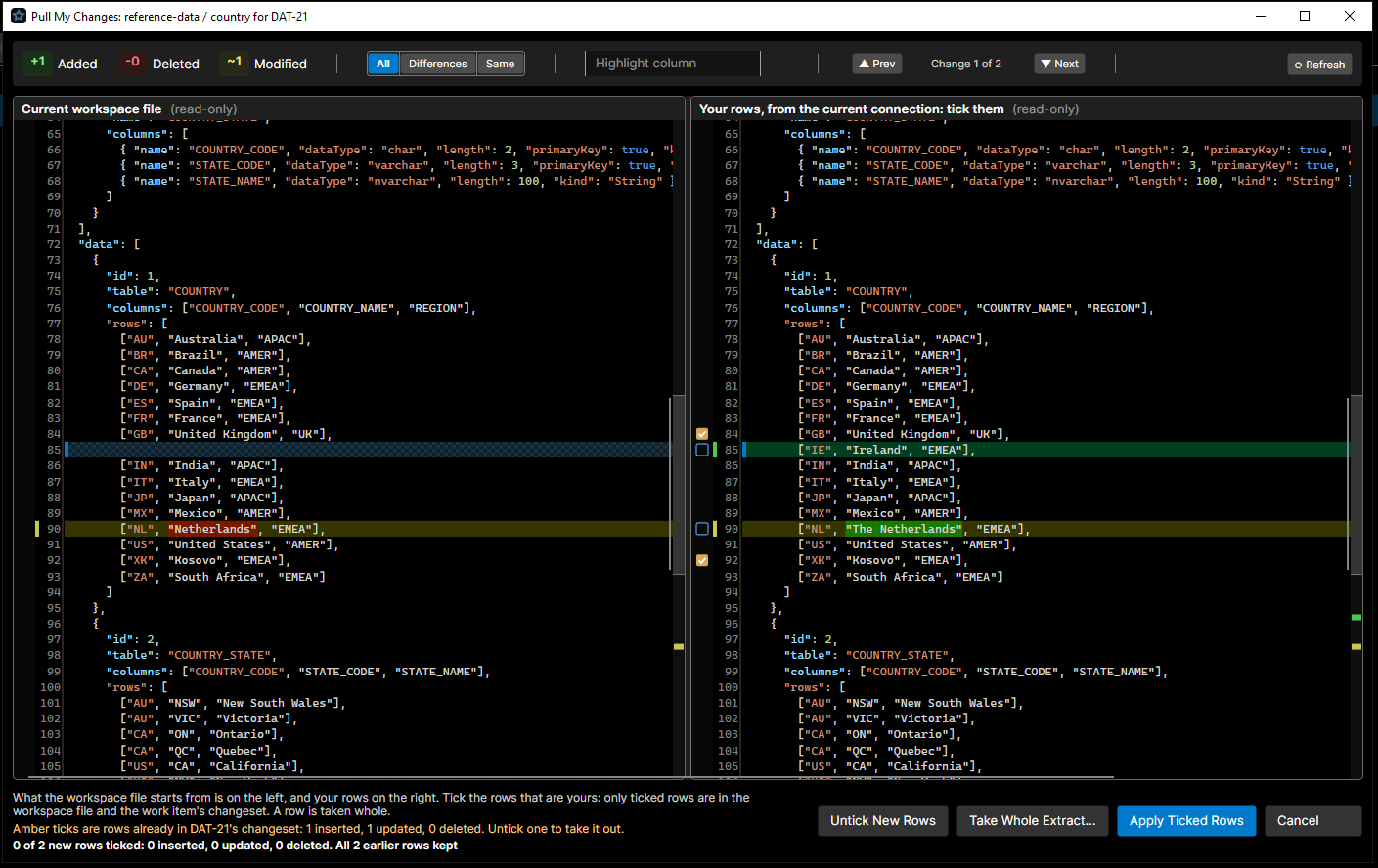
The picker is the side-by-side compare. On the left is what the workspace file starts from (Current workspace file, or Workspace file, reset to branch 'main': an unticked row keeps that value, a row it lacks is removed). On the right are your rows (Your rows, from the current connection: tick them): the left side with every row on offer taken, so each row is one changed line. A tick box sits beside each line that is a row you can take. Deletes are ticked on the left, where the row is; inserts and updates on the right.
- New rows have a blue tick box and start unticked. They are what the source holds that the workspace file does not.
- Rows already in the changeset have an amber tick box and start ticked. A line under the compare says so:
Amber ticks are rows already in DAT-21's changeset: 1 inserted, 1 updated, 0 deleted. Untick one to take it out.Unticking one puts the row back as it was before the work item and drops it from the changeset. - A row that cannot be ticked shows a dash. Click it and the status line says why:
the template does not insert into COUNTRY;the template never updates DESCRIPTION in COUNTRY, so deploying it would change nothing, when every column the row changes isUpdateExcludeorUpdateTrigger="false"; or that its parent row is another work item's unmerged row (see Two work items on one component).
A row is taken whole: there is no column-level ticking. The status line counts as you go: 1 of 3 new rows ticked: 1 inserted, 0 updated, 0 deleted. All 2 earlier rows kept.
To tick many rows at once:
- Tick All ticks every row that can be ticked.
- Shift-click a tick box to set every row from the last one you clicked to this one, the way this one is being set.
- Select lines in either side of the compare and press Space, or right-click for Tick Selected Rows, Untick Selected Rows and Tick All Rows. Space ticks the selected rows when any of them that can be ticked is not, and unticks them otherwise; with nothing selected it acts on the row on the caret's line.
Rows that cannot be ticked are left as they are, and the status line counts them: 1 row cannot be ticked; click its dash to see why.
When the workspace file starts from a branch or a database, each row is offered with your source's value wherever your source changed it, and with the workspace file's value where only the file did. A ticked row takes the value shown; an unticked one takes the base's. When the workspace file holds a third value for a row your source also changed, neither the base's nor your source's, ticking it replaces the file's value, and the status line says so: 1 ticked row takes the database's values over other values in the workspace file.
| Button | What it does |
|---|---|
| Tick All | Ticks every row that can be ticked. |
| Untick New Rows | Unticks every new row and leaves the amber ones alone. It reads Untick All when the changeset has no rows yet. |
| Take Whole Extract... | Replaces the workspace file with the whole of the source, every other work item's rows included, and deletes the work item's changeset, which would no longer describe it. It asks first, and is for rebuilding a branch's data from an environment (or making the file match another branch exactly). The file is recorded as an extract, as Database Pull would record it. |
| Apply Ticked Rows | Writes the ticked rows into the workspace file and rebuilds the changeset. |
| Cancel | Leaves the component as it was. |
A tick that breaks a parent-child rule is refused when you apply, with the reason (its COUNTRY row (COUNTRY_CODE = XK) would not be in the workspace file, so this row cannot be kept without it; tick the parent row too, or removing it leaves 2 of its COUNTRY_STATE row(s) in the workspace file without it; remove those rows too), and the picker reopens with your ticks kept.
What gets written
The changeset is written first, then the workspace file, so a failure part way is visible to the commit check rather than silent. The workspace file becomes the base plus the ticked rows; the changeset is rebuilt from the difference between the two. When nothing is left ticked the changeset file is removed.
A changeset points at the same shared definition as the workspace file, so it inflates on its own:
{
  "formatVersion": 3,
  "operation": "changeset",
  "category": "reference-data",
  "name": "country",
  "variables": { "${name}": "country" },
  "definition": "countries.8c0d8d23ab2f",
  "changeset": {
    "workItem": "DAT-21",
    "base": { "kind": "document" },
    "captured": "2026-09-21T10:12:00+00:00"
  },
  "changes": [
    {
      "id": 1,
      "table": "COUNTRY",
      "columns": ["COUNTRY_CODE", "COUNTRY_NAME", "REGION"],
      "rows": [
        { "after": ["XK", "Kosovo", "EMEA"] },
        { "before": ["GB", "United Kingdom", "EMEA"], "after": ["GB", "United Kingdom", "UK"] }
      ]
    }
  ]
}
For a template with TrackChanges="true", the workspace file is written with the checksum of the rows it now holds, so Check for Changes can still compare it. When the pull's results say no checksum could be recorded, Update Checksum records one later.
A row with no before is an insert; one with no after is a delete. base.kind is document when the file started from the workspace file, branch or database when it was started from one of those, with the branch name or the connection and read time as version. Open Changeset (JSON) on the component opens the file read-only, in a tab named country.json (changeset). View Changeset SQL shows the SQL it deploys as, read-only.
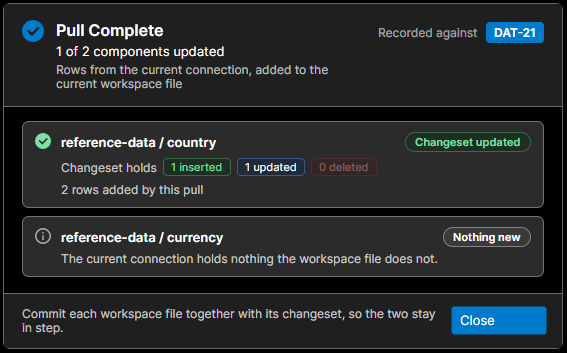
Pull Complete
One summary for every component pulled, headed Changeset updated for a single component or 2 of 3 components updated for several, with the comparison under it (Rows from the current connection, added to the current workspace file). Each component has a card:
| Status | Meaning |
|---|---|
Changeset updated | Rows were taken. The detail says how much of it is new (2 rows added by this pull, 1 taken out), and the counts are the whole changeset, earlier pulls included. |
Nothing new | The source holds nothing the workspace file does not. |
Changeset removed | The rows ticked leave no changes, so the work item has no changeset for it. |
Whole extract taken | Take Whole Extract replaced the file and deleted the changeset. |
Cancelled | The picker was cancelled. |
Skipped | The changeset could not be started again, so nothing was pulled; the message says why. |
Failed | The component could not be read or written; the detail says why. |
The summary is not shown when every picker was simply cancelled.
Pulling again
Pull again from the current workspace file whenever you change more rows. The picker offers what has changed since, with your earlier rows amber and ticked. A row you took earlier that the database has changed again is offered once more, as new, with its new value.
Rows main gained while your branch was open, once they have reached the database, are offered as new rows too: your workspace file does not hold them yet. Leave them unticked; they arrive when you merge main in.
Apply Draft
Database Pull to Draft works for changeset components too. Apply on the draft opens the same dialog as Apply Draft: step 2 is fixed (The draft extracted from 'DEV'. Its rows were read when the draft was extracted, so nothing is read again.), step 1 still asks what the workspace file starts from, and the picker follows. The draft is used up once its rows are taken, whether or not every row was. Cancelling the dialog cancels the apply, for that component and any others selected with it.
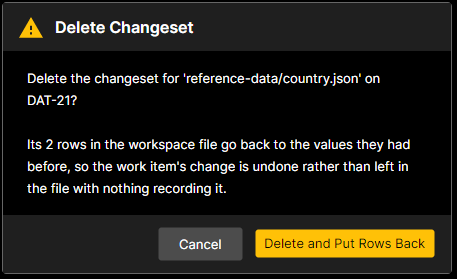
Delete Changeset
Delete Changeset on the component removes the work item's changeset and puts its rows back: each changed row returns to its before, each inserted row goes, each deleted row comes back where it was. The confirmation says how many: Delete the changeset for 'reference-data/country.json' on DAT-21? Its 2 rows in the workspace file go back to the values they had before, so the work item's change is undone rather than left in the file with nothing recording it. The button is Delete and Put Rows Back.
For a template that tracks changes, the file keeps a checksum of the rows it is put back to: the committed file's, when it goes back to exactly that, otherwise one the connected database computes.
Rows go back in the order the committed file holds them, and lookup hashes only the work item's rows used go with them, so a workspace file whose only changes were the work item's goes back to exactly what version control holds and no longer shows as modified.
Sometimes the rows cannot be put back:
- a row has moved on since (main merged another value, the file was re-extracted or edited by hand), and putting its before value back would overwrite what it holds now:
2 rows in 'reference-data/country' hold neither the before nor the after values this changeset records, so something has changed them since it was built.; - the changeset, the workspace file or its shared definition cannot be read;
- the template no longer deploys changesets.
The changeset can still be deleted. The confirmation says why the rows cannot go back, and its button becomes Delete Changeset Only: the changeset file is removed and the rows stay in the workspace file as they are, with nothing recording them. Restore the file from version control if you want them gone too. If you would rather keep the changeset in step with the file, pull your changes again to rebuild it, then delete it.
Full Database Pull
A full Database Pull (extract) of a changeset component replaces the workspace file with everyone's rows, so the changeset would no longer describe it. DataStar asks first:
Pull Replaces the Changeset Pulling from the database replaces the workspace file with the whole of the database, including every other work item's in-flight rows. DAT-21's changeset is measured from a baseline the file would no longer sit on, so it would be deleted: ... Pull My Changes takes only your rows and keeps the changeset. Continue and replace?
Replace and Delete Changeset goes ahead. Only a component whose document was actually written loses its changeset; a pull that is cancelled, fails or finds nothing in the database keeps it.
Committing
A changeset and its workspace file are one change written twice, so they go into version control together. DataStar checks both directions whenever you commit or check in:
- a changeset being committed is checked against the workspace file: does the file carry the changeset's rows?
- a workspace file being committed is checked against the active work item's changeset for it: does the file still agree with what the changeset claims?
If they disagree, the commit is refused and says which file and how many rows:
These changesets do not match the component documents they were taken from, so committing them would leave the branch and the work item saying different things:

  changesets/DAT-21/reference-data/country.json: the component's document does not carry 2 rows this changeset applies

Pull your changes again to rebuild the changeset against the document, or unstage the changesets.
(holds 2 rows differently again means the file has neither the before nor the after; its component has no document in the workspace means the file is missing.)
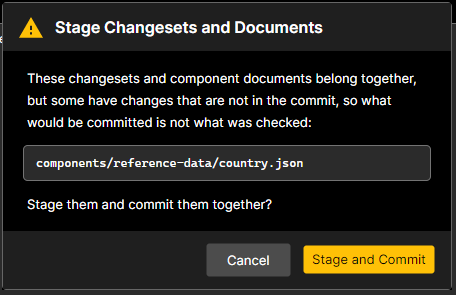
If they agree but only one half is in the commit, DataStar offers the other:
- Git:
Stage Changesets and Documentslists the files with changes outside the index and offers Stage and Commit, so what is committed is what was checked. - TFVC:
Check In Changesets With Their Documentslists the pending files that are not selected and offers Include and Check In.
Only the active work item's changeset is measured against a document. Another work item's changeset on the same branch is legitimately ahead of or behind it.
Deploying a changeset
For a component whose template deploys changesets, a work item's deployment item is its changeset, not the workspace file.
Adding changesets to a deployment
- Add Components... in the Deployment view, with
DataChangesetsas the add method: enter the work item (Work Item: DAT-21) and every changeset the work item keeps in the workspace is added, each pinned to its latest committed version, ordered where its component would sit. If the deployment already holds one of the components as the component itself, nothing is added:The deployment already holds reference-data/country.json as the component itself; a component deploys either its changeset or itself, so the changesets of 'DAT-21' were not added. - Import from Commits into the basket recognises a changeset among the work item's commits and adds its component. A component whose document changed in those commits but which has no changeset is reported instead of imported:
The commits for 'DAT-21' change these components' documents, but the components deploy changesets and the task has none for them, so they were not imported; pull the task's changes to make its changesets. - Add from Basket adds a component that deploys changesets as the work item's changeset when it has one. When it has none (no work item, or nothing pulled for it yet), the component's document is added instead, marked
SS, and deploying it asks first (Deploy Full Snapshot, below). - The Kind column marks each row:
CSa changeset (Applies only work item DAT-21's rows of reference-data/country, checking each against the target first),SSa data document deployed whole (a snapshot),TRa script a template triggered. Blank for a plain script.
A deployment holds either a component's changeset or the component itself, never both: they carry the same rows, and whichever ran second would undo the first's check. A deployment file that holds both is refused when it runs: 'reference-data/country.json' is in this deployment both as its component and as changeset DAT-21; deploy one or the other.
Deploying the document of a changeset template is still possible, for rebuilding an environment from main, but it asks first (Deploy Full Snapshot: Deploying a full snapshot makes the target hold exactly the document's rows, removing every other work item's rows in the component's scope.).
Several work items in one release
A release that bundles several work items can hold a changeset each for one component. Both package as reference-data/country.json, so they cannot travel as two items: they are combined into one changeset before anything is inflated, by the client when the deployment runs and by build when it packages, so a bundled release deploys the same one changeset whichever way it is run.
- Rows on different keys are taken as they are.
- A row both change is taken as a chain, the first work item's before and the last one's after, when the second starts where the first left the row.
- The identical change made by both is taken once: the second would find it already applied.
- A row the second puts back as it was before the first (inserted then deleted, changed then changed back) is refused. Combined, the release would have to put the row back on a target that already has the first work item and leave it alone on one that never had it, and roll each back the other way; one before and after cannot say both:
Changesets DAT-21 and DAT-22 both change row "GB" of table 'COUNTRY' in 'reference-data/country', and DAT-22 puts it back as it was before DAT-21. Combined, the release could not both put back a target that already has DAT-21 and roll back one that never had it; deploy them separately. - Otherwise the combination is refused, naming both:
Changesets DAT-21 and DAT-22 both change row "GB" of table 'COUNTRY' in 'reference-data/country', and DAT-22 does not start where DAT-21 left it; deploy them separately, or rebase one on the other. - Changesets captured with different versions of the template, or with different columns, are refused too.
The combined changeset records both work items as DAT-21+DAT-22, so the script's banner says where its rows came from.
Running a changeset without a deployment
To try a work item's changeset against a database before it is in a deployment, right-click the component:
- Run Changeset SQL ▸ Run with Current Connection runs the changeset's SQL against the open connection. You are asked for the mode first; it defaults to ROLLBACK, so you can watch what it would do against a real target and undo it, and choose COMMIT when you mean it.
- Run Changeset SQL ▸ Run with Connection... picks a connection now, with the mode chosen alongside it (again defaulting to ROLLBACK), and closes that connection when the run ends.
It runs in a deployment log tab, as Run does for a script, and the SQL is inflated for the connection it runs against. It is the script a deployment runs, checks and all: a row the target already holds counts as already applied, and a row someone has changed since stops it. Run on the component runs its whole workspace file instead, every row and not only the work item's. Its reverse is under Rollback (Rolling back a changeset).
What the script does
The generated script prints what it intends, then checks each table's rows against the target before that table is touched:
INFO: Changeset : DAT-21 : reference-data.country
INFO: Changeset : [dbo].[COUNTRY] : Inserts 1 : Updates 1 : Deletes 0
For each row it finds the target's row by key and decides Apply, Applied or Conflict. After the check it prints how many rows were already there (INFO: <staging table> : Changeset Changes Already Applied : 0), and if there is no conflict the MERGE writes the inserts and updates and the deletes run, exactly as a snapshot deploy of those rows would.
When the before does not match the target
A changeset is not applied blindly. The check runs inside the generated script, against the target it is about to change, so it sees the target as it is at that moment. For each row:
| Change | The target holds | Verdict | What happens |
|---|---|---|---|
| Insert | no such row | Apply | the row is inserted |
| Insert | a row with the after's values | Applied | skipped: already there |
| Insert | a row with other values | Conflict | the deployment stops |
| Update | no such row | Conflict | the deployment stops |
| Update | the after's values | Applied | skipped: already there |
| Update | the before's values | Apply | the row is updated |
| Update | other values | Conflict | the deployment stops |
| Delete | no such row | Applied | skipped: already gone |
| Delete | the before's values | Apply | the row is deleted |
| Delete | other values | Conflict | the deployment stops |
| (child row) | a row a parent's delete would cascade to that the changeset does not delete | Conflict | the deployment stops |
| Any | two or more rows with the change's key | Conflict | the deployment stops |
The last line is worth a word. Deleting a parent also deletes the child rows the template cascades to (DeleteCascade="true" on the child, in tables that delete). If the target holds such a child and the changeset does not list it as a delete, somebody else's row would go, so it is a conflict.
The line before it covers a target whose key is not unique: two rows answering to the key the changeset identifies the row by (its alternate key, where the template declares one). The key then does not say which row the change means, so nothing is changed. On SQL Server the change is reported as a conflict; on Oracle the script stops before it reads the target's keys, with ERROR: Changeset Conflict : <table> : Key : <key>. Make the key unique in the target, then deploy again.
A key that changes (other than in case only) is a delete of the old key and an insert of the new one, and each is judged on its own line of the table above.
Only compared columns count
"The same values" means the columns the script compares when it decides whether to update a row. Columns marked UpdateExclude, columns with UpdateTrigger="false", computed columns and the keys the target sets itself (generated keys, and columns joined to a parent's generated key) are never compared, so a differing audit or timestamp column is not a conflict. On SQL Server values are compared under the database's collation, so a difference in case alone is not a difference either, unless the template sets ExactComparison="true". Oracle compares exactly, and every Oracle changeset refuses a session set to compare case-insensitively (below), which would take a value changed only in case for the same value and write nothing.
One transaction, all or nothing
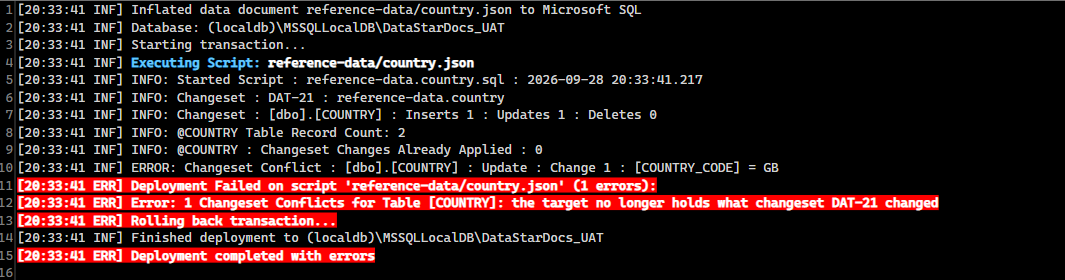
The deployment runs in one transaction. A conflict prints one line per conflicting row (the first 50, then a count of the rest), raises an error, and the transaction rolls back with nothing applied, including tables of the same changeset and items earlier in the same deployment. On SQL Server:
ERROR: Changeset Conflict : [dbo].[COUNTRY] : Update : Change 2 : [COUNTRY_CODE] = GB
Error: 1 Changeset Conflicts for Table [COUNTRY]: the target no longer holds what changeset DAT-21 changed
On Oracle:
ERROR: Changeset Conflict : "APP"."COUNTRY" : Update : "COUNTRY_CODE" = GB
ORA-20000: 1 Changeset Conflicts for Table "APP"."COUNTRY": the target no longer holds what changeset DAT-21 changed
Change 2 is the change's number in the changeset file, so the row can be found there. A cascaded child row is printed as Cascade with the child's key. Each conflicting row is printed before the error, so the deployment log names the rows and the error counts them.
DataStar.Tools does the same: each work item runs in its own transaction, and a conflict rolls that work item back.
"Changeset Changes Already Applied"
Because "already applied" is its own verdict, deploying a changeset twice changes nothing the second time. The script says how many rows it found already in place (Changeset Changes Already Applied : 2) and leaves them alone. That is what makes it safe to promote the same changeset from DEV to UAT to production, and to re-run a release that stopped part way.
A worked example
The changeset for DAT-21 holds three changes to COUNTRY, measured from main (the base):
| Row | Base (main) | Changeset | Change |
|---|---|---|---|
XK | (no row) | XK, Kosovo, EMEA | insert |
GB | GB, United Kingdom, EMEA | GB, United Kingdom, UK | update |
DE | DE, Germany, EMEA | (no row) | delete |
Deployed to a UAT that matches main:
| Row | UAT holds | Verdict | UAT afterwards |
|---|---|---|---|
XK | (no row) | Apply | XK, Kosovo, EMEA |
GB | GB, United Kingdom, EMEA | Apply | GB, United Kingdom, UK |
DE | DE, Germany, EMEA | Apply | (deleted) |
Changeset Changes Already Applied : 0, and all three rows are written. Run it again and every row is Applied: Changeset Changes Already Applied : 3, nothing changes.
Now the same changeset against a UAT where somebody has been busy:
| Row | UAT holds | Verdict | Why |
|---|---|---|---|
XK | XK, Kosovo, EMEA | Applied | already inserted, perhaps by hand |
GB | GB, United Kingdom, EU | Conflict | neither the before (EMEA) nor the after (UK) |
DE | DE, Deutschland, EMEA | Conflict | not the before: somebody changed it, and deleting it would throw that away |
INFO: Changeset : DAT-21 : reference-data.country
INFO: Changeset : [dbo].[COUNTRY] : Inserts 1 : Updates 1 : Deletes 1
INFO: <staging table> : Changeset Changes Already Applied : 1
ERROR: Changeset Conflict : [dbo].[COUNTRY] : Update : Change 2 : [COUNTRY_CODE] = GB
ERROR: Changeset Conflict : [dbo].[COUNTRY] : Delete : Change 3 : [COUNTRY_CODE] = DE
Error: 2 Changeset Conflicts for Table [COUNTRY]: the target no longer holds what changeset DAT-21 changed
Nothing is written, not even XK, which was already there anyway. UAT is exactly as it was before the deployment ran.
Seeing it before you deploy
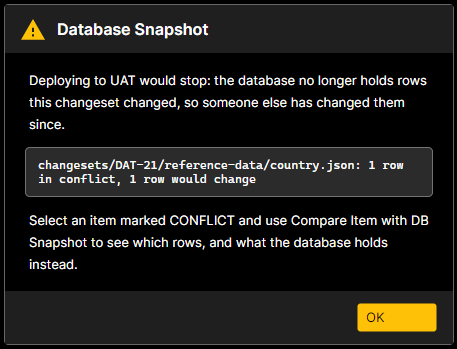
Database Snapshot on the Deployment toolbar reads each changeset against the chosen database row by row and marks the item MATCH (every row already applied, nothing would change), CHANGED (rows would be written) or CONFLICT (deploying would stop). A conflict is said outright as well, in a notice that names each conflicting changeset with its row counts (changesets/DAT-21/reference-data/country.json: 1 row in conflict, 1 row would change) under Deploying to UAT would stop: the database no longer holds rows this changeset changed, so someone else has changed them since. Anything else that would stop the deployment before it starts, such as a changeset beside its own component's document, is listed in the same notice. A changeset captured from the other vendor, or whose template cannot be found, is N/A.
Compare With… → Compare with DB Snapshot on the row then shows the changeset beside what the target holds, both written as a changeset file is. On the left is the changeset as deploying would apply it; on the right are the same changes, each keeping its before, with the row the target holds now as the after. A row the target already holds as the changeset wants it reads the same on both sides, so the diff shows only the rows that would change or conflict, and the column values that differ. A row the target does not hold has no after on the right: an insert not yet made reads as {}, and an update or delete of a row the target no longer holds keeps only its before. The window's title counts them (1 would change, 1 already applied, 1 conflict(s)). This is a prediction made in DataStar with the same rules as the script; the script's own check when the deployment runs is what decides.
What to do about a conflict
A conflict means the target's row is not what your changeset expected. Decide which of the two is right:
- Their change is wanted, and yours should sit on top of it. Pull your changes again with step 1 A database, choosing the target (UAT), and step 2 the database that holds your version (DEV). The workspace file is reset to the target's rows, your changeset is started again with the target's values as its befores, and you tick your rows afresh. Commit and deploy again.
- The row should carry main's value plus yours. Somebody changed the target by another route and main never had it. Either they put the row back, or you take their value into main first (pull it against
mainas the base on a branch of its own, merge, and re-pull yours). - Resolve by hand. Edit the target's row back to the before, or forward to the after, and run the deployment again. A row already at its after is simply
Applied.
Whichever you choose, the deployment is safe to run again once the rows agree: rows already in place are skipped, and nothing was applied by the run that stopped.
Rolling back a changeset
The rollback is the inverse changeset: the same rows with before and after swapped, so an insert reverses to a delete and a delete to an insert. It is checked exactly as the changeset was: every row must still be at the changeset's after (or already back at its before, which counts as applied), and a row somebody has changed since is a conflict that stops it rather than being overwritten. It undoes the work item, not one run of it, and running it twice changes nothing the second time. If a later work item changed the same rows, reverse the later one first; the check stops on its rows otherwise.
On the component:
- Rollback ▸ View Rollback SQL shows the SQL that reverses the work item's changeset, read-only.
- Rollback ▸ Run Rollback SQL ▸ Run with Current Connection runs it against the open connection. You are asked for the mode first; it defaults to ROLLBACK, so you can watch the SQL run against a real target and undo it, and choose COMMIT when you mean it.
- Rollback ▸ Run Rollback SQL ▸ Run with Connection... picks a connection now, with the mode chosen alongside it (again defaulting to ROLLBACK), and closes that connection when the run ends.
The run opens in a deployment log tab, as Run does for a script. The rollback is inflated for the connection it runs against.
Case-only key changes
Renaming a key only in case (ALERIANINDEX to AlerianIndex) is a special case, because the two vendors do not agree on whether that is one row or two.
SQL Server depends on the key.
A row identified by its alternate key (a table whose key the target generates) is matched as the database compares text, case-insensitively under the default collations: the two spellings are one row, and the change is an update. Whether it is deployed depends on the template:
- Without
ExactComparison, the values compare equal under the collation, so the row reads as already applied and nothing changes. The row is not lost, but it is not renamed either. - With
ExactComparison="true", values are compared byte for byte and the alternate keys join the columns an update sets, so the row is renamed in place and keeps its generated id and its children.
A row identified by a string key of its own (its primary key, merged on) is matched exactly, unless the column says CaseSensitive="false": the two spellings are two rows, and the change is a delete and an insert. On a database that compares case-insensitively, as most do, the two spellings are one key to the table, so the script respells the key in place before it merges: the row keeps its other values, and child rows that carry the key are respelled with it. On a case-sensitive database the old row is deleted and the new one inserted. Either way a second run finds the change applied, and the rollback spells the key back.
Oracle compares text exactly, so the two spellings are two rows and the change is a delete and an insert. The row is replaced, so a key the database generates (a sequence value) takes a new value, and anything referring to the old one must be updated. The pull warns once the changeset is written, naming the rows:
Key Changed Only In Case In 'imports / ALERIANINDEX', these rows change a key only in case: IMP_FEED: ALERIANINDEX to AlerianIndex On Oracle each is deployed as a delete of the old row and an insert of the new one, so a key the database generates (a sequence value) takes a new value, and anything referring to the old one must be updated. A session set to compare case-insensitively will refuse the deployment.
A session that compares text case-insensitively (NLS_COMP set to LINGUISTIC or ANSI with a _CI or _AI NLS_SORT) would see both spellings as one row, count both changes as applied and change nothing while reporting success. It would do the same to any value changed only in case, a description Alerian index becoming Alerian Index. So every Oracle changeset checks the session before anything is applied, and stops with ORA-20001: Changeset DAT-21 changes keys only in case (IMP_FEED: ALERIANINDEX to AlerianIndex), which this session cannot tell apart: it compares text case-insensitively (NLS_COMP LINGUISTIC, NLS_SORT BINARY_CI). Deploy it from a session that compares exactly., or, for a changeset with no such keys, ORA-20001: Changeset DAT-21 is checked and applied by comparing values exactly, which this session cannot do: .... A changeset written before changesets carried their template takes the template it is deployed with to find those keys.
File: static/img/screenshots/changesets-case-only-warning.png
Capture: The Key Changed Only In Case warning after pulling an Oracle component for DAT-21 where a key was renamed from ALERIANINDEX to AlerianIndex, showing the row list and the paragraph about the delete and insert.
Two work items on one component
- On different branches, sharing one database (the usual case): each work item pulls its own rows. A colleague's rows appear in your picker, since they differ from your workspace file, and you leave them unticked. One refusal to expect: a row you tick whose parent row is neither in your workspace file nor ticked is refused, naming the parent, because the parent is the other work item's unmerged row and your row could not resolve it at deploy time. The two changesets live under different work-item folders, so they never collide in version control, and they deploy in either order.
- On one branch: rows another work item has already pulled onto the branch are in the workspace file, so they are not offered as yours. The commit check measures a document only against the active work item's changeset.
- In one deployment: the changesets are combined, and refused when one does not start where the other left a row.
- Merging both to main: by row, in whichever order they land. A row both changed differently is a genuine conflict, resolved by hand as below.
When main is merged into your branch
Your workspace file is main's rows plus yours. When main moves on, merge it in as you would any branch; with the merge driver registered the document merges by row, and your changeset file is yours alone, so nothing touches it.
- Rows main changed that you did not: taken by the merge, and nothing else to do. Your changeset does not mention them, so the base worked out from your workspace file now includes them, which is exactly what main's rows are.
- A row main also changed, the same way: taken once. Your changeset still lists it; deploying finds it already applied and skips it.
- A row main also changed, differently: the merge driver reports it by table and key (
both sides changed table COUNTRY row COUNTRY_CODE = GB differently; ours was kept) and git marks the file as conflicted. The file is still a valid document with no conflict markers: open it, settle the row, andgit addit. Your changeset's before for that row is now stale: it records the value main used to hold, while main, and every environment main has been deployed to, holds another. Deployed as it is, that row would conflict. Run Pull My Changes... once more with step 1 A branch: main and step 2 the database that holds your rows. The changeset starts again against main's rows as its befores; tick your rows afresh.
Limits worth knowing
- A changeset applies only to the vendor it was captured from, with or without a connection: rows are matched by an identity that is vendor specific.
- Whole rows only. Two people editing the same row is a conflict, at merge time and at deploy time; there is no column-level ticking.
- A table whose template disables inserts, updates or deletes cannot have that kind of change ticked (
the template does not insert into COUNTRY); the generated script could not express it. A changeset that reaches deployment with such a change is refused before any SQL is written (Changeset DAT-21 deletes 2 row(s) of table 'COUNTRY', which template 'countries.xml' does not delete from). - A table with no key the target does not generate cannot be identified, and the pull says so.
Troubleshooting
| You see | Where | What to do |
|---|---|---|
Pulling changes into a changeset needs a work item: set the basket's task, or assign a task to the branch. | Pull My Changes | Set the basket's task or make the work item the active task. |
Its template '<file>' does not deploy changesets. | Pull Complete | The template lacks DeployMode="changeset". Fix the template. |
'<file>.json' is not a readable data document. | Pull My Changes | The branch still holds the component as .sql, or the file is damaged. Extract the component once (a full pull) to create the document, then pull your changes. |
The database's columns for table 'X' differ from the branch document's; the template or schema has changed, so take a full extract instead | Pull My Changes | The schema moved, or the template changed which columns the document keeps values for (a column's Include, CurrentDate, Increment, or a %...% Value) since the document was extracted. Take a full extract (which clears the changeset), commit, then pull your changes again. |
The base's columns for table 'X' differ from the branch document's | Pull My Changes | The branch or database you chose to start from was captured under another schema. Choose one captured under the same schema. |
The database has rows in table 'X' (id N), which the branch document does not have (or The base has rows...) | Pull My Changes | The template gained a table since the branch document was captured. Take a full extract, commit, then pull your changes again. |
Another pull changed this component while its rows were being picked, so nothing was written. | Pull Complete | Someone, or an agent through the MCP server, pulled rows into the same component while the row picker was open. Open Pull My Changes... again and pick from the component as it is now. |
The branch's document was captured from Microsoft and the database is Oracle | Pull My Changes | Take your rows from a database of the vendor the document came from. |
Rows of table 'X' cannot be identified: its key 'Y' is generated or resolved at deploy time, and the template declares no alternate key or lookup to identify it by | Pull My Changes | Give the table an alternative key, or a lookup on the generated key. |
its <PARENT> row (...) would not be in the workspace file, so this row cannot be kept without it; tick the parent row too | Row picker | Tick the parent too, or wait for the other work item to merge and pull again. |
removing it leaves N of its <CHILD> row(s) in the workspace file without it; remove those rows too | Row picker | Tick the children's deletes as well. |
Nothing new | Pull Complete | The source holds nothing the workspace file does not. Check you are connected to the database you changed. |
Skipped: Its changeset could not be started again, so nothing was pulled | Pull Complete | The message before it says why, usually that rows have moved on since the changeset was built. Pull from the current workspace file instead. |
the template never updates <columns> in <table>, so deploying it would change nothing | Row picker | The row differs only in columns the template leaves alone. Leave it unticked, or change the template if those columns should deploy. |
These changesets do not match the component documents they were taken from | Commit / Check In | Pull your changes again to rebuild the changeset against the document, or leave the changesets out. |
Stage Changesets and Documents / Check In Changesets With Their Documents | Commit / Check In | Choose Stage and Commit or Include and Check In, so both halves go in together. |
Pull Replaces the Changeset | Database Pull | You are about to extract a changeset component whole. Cancel and use Pull My Changes... unless you mean to rebuild the branch's data from this environment. |
N rows ... hold neither the before nor the after values this changeset records | Delete Changeset | The document moved on. Pull your changes again first, then delete. |
The commits for '<task>' change these components' documents, but the components deploy changesets and the task has none for them | Import from Commits | Pull the task's changes so it has changesets, then import again. |
The deployment already holds <component> as the component itself | Add Components | Remove the document item, then add the work item's changesets. |
Deploy Full Snapshot | Deploy | The deployment holds a changeset component's document. Cancel unless you are rebuilding an environment from main. |
Changesets A and B both change row ... and B does not start where A left it | Deploy / build | Deploy the work items separately, or rebase one branch on the other and pull again. |
Changesets A and B both change row ... and B puts it back as it was before A | Deploy / build | Deploy the work items separately. |
Error: N Changeset Conflicts for Table [X]: the target no longer holds what changeset <work item> changed | Deployment log | Someone changed those rows in the target since. See What to do about a conflict. |
ORA-20001: Changeset ... which this session cannot tell apart or ... which this session cannot do | Deployment log (Oracle) | Deploy from a session whose NLS_COMP is BINARY, or whose NLS_SORT is not _CI or _AI. |
Changeset <work item> cannot be applied: ... must set Version="2" for SQL Server | Deploy / build | Fix the template and pull again. |
it was captured from Microsoft; a changeset applies only to the vendor it was captured from | Deploy / build | You are deploying a changeset to the other vendor. Capture it from that vendor. |
What to do next
- Store data as documents (JSON), which changesets require.
merge: the git merge driver, so two work items merge by row.build, which combines a release's changesets and inflates them into the package.- Data component schema for
DeployModeandExactComparison.