Step 4: Finalize
The last step. Review and execute the wrap-up actions: push / check-in, Git tag, CI/CD pipeline trigger, and any others configured.
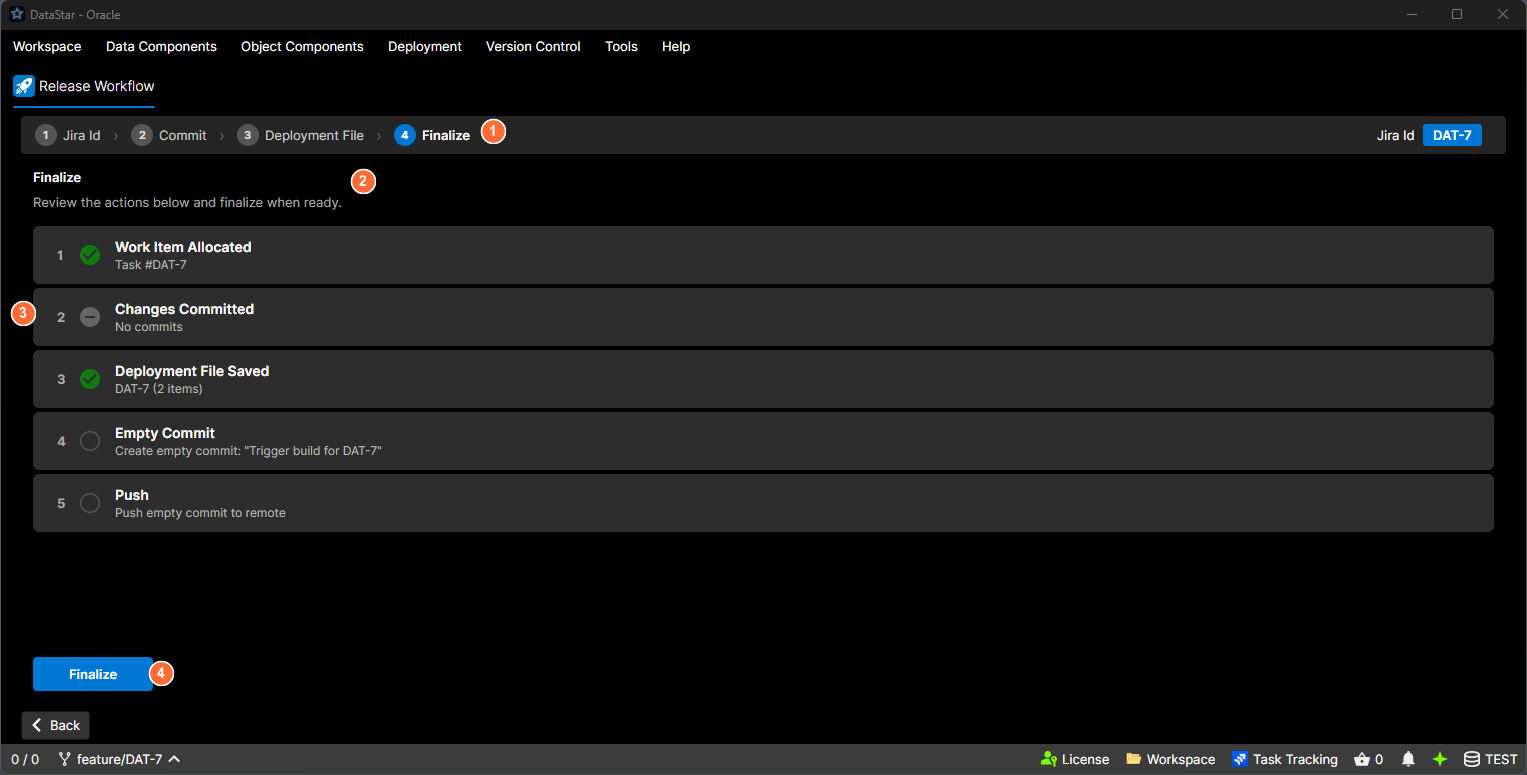
- Step indicator: numbered breadcrumb; Step 4 is highlighted.
- Heading: "Finalize" with instruction text.
- Action checklist: each finalisation action with its status icon (pending, success, failed, skipped).
- Finalize button: runs all pending actions in order.
What's on screen
Heading
Finalize. "Review the actions below and finalize when ready."
Action checklist
A list of every action that will run as part of finalisation. Each row has:
- A step number.
- A status icon:
- Pending. Hollow grey circle.
- Running. Spinning blue dashed circle.
- Success. Green checkmark.
- Failed. Red ×.
- Skipped. Grey dash.
- The action's Name and short Description.
- Optional detail text underneath: error output in red, informational output in neutral grey.
Which actions appear depends on your Release settings. They typically include:
- Committing and pushing the deployment file (if configured to live in the workspace).
- Creating a Git tag (if a tag format is configured).
- Triggering the configured CI/CD pipeline (if one is configured).
If nothing is configured, the list shows "No actions configured."
Buttons
Different buttons appear depending on state:
| Button | Shown when | What it does |
|---|---|---|
| Finalize | There are pending actions to run | Runs every pending action in order. |
| Cancel | An action is currently running | Cancels the in-progress run. |
| Close | All actions have finished | Closes the wizard. |
Status messages
- A green status line appears once finalisation completes successfully.
- A red banner appears if any action failed, with the error message.
If an action fails
The failed action's row shows the error detail. Other actions in the list may have been skipped as a result. You can:
- Go back to earlier steps of the wizard to fix the cause.
- Close the wizard and retry the finalisation by re-running Deployment → Release Workflow.
What happens after Finalize
- Commits and tags are in your remote (Git) or on the server (TFVC).
- The deployment file is attached to the task (if that storage mode is configured).
- The CI/CD pipeline (if one is configured as a finalisation action) has been triggered and is running in the background.
Deployment execution against target environments is a separate step; see deployment files for running the deployment itself.